
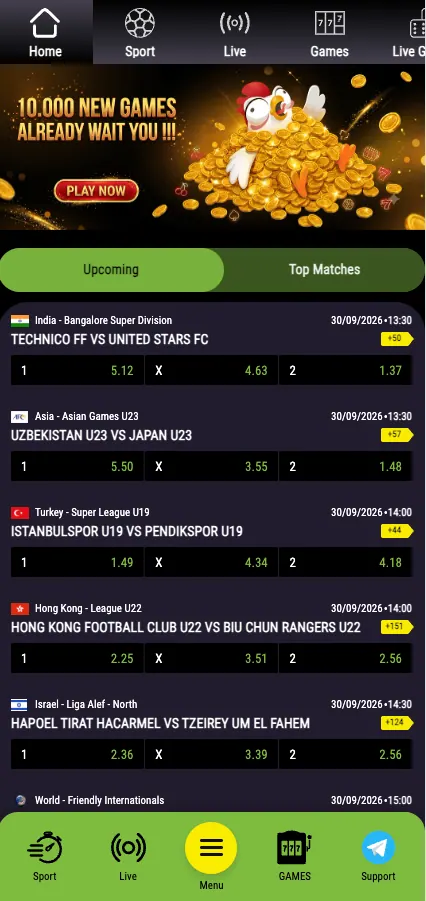
Money moves in and out of a Mezzo bet account through one place: the cashier. Players in Ethiopia see it as a page called Deposit Methods, and everything is counted in Ethiopian birr (ETB, Br). Searches for the "cashbox" usually point to this same section.
This page walks through what the cashier looks like, how a deposit and a withdrawal work step by step, and what to do when a payment does not show up. Mezzo bet is an operator, and this site is an independent information page about it, not the official site.
18+ · Play responsibly
Cashbox Mezzo bet: what the cashier looks like
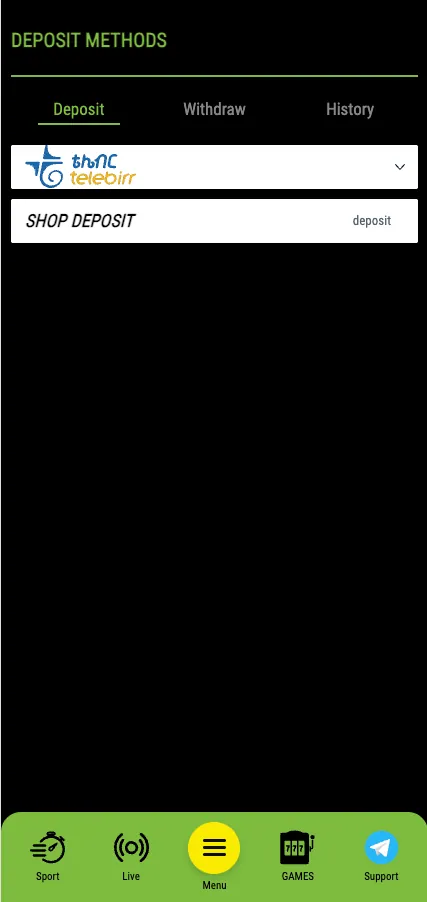
The cashier has three tabs at the top: Deposit, Withdraw and History. Below them sits a list of payment methods. Each method is shown with its logo, and tapping it opens the options for that method.

On a phone the layout is the same, only stacked in one column. The bottom bar keeps Sport, Live, Menu, Games and Support within reach, so the Support chat is one tap away if a payment needs checking. Anyone using the mobile version can read more about it on the App page.
Payment methods in ETB
The cashier check showed Telebirr, Ethiopia's mobile money service, as the deposit method, together with a Shop deposit option for paying through a point of sale. The list a player sees can change by account and over time, so the cashier itself is the only reliable source for the current set of methods.
| Method | Deposit | Withdrawal | Limits, time and fees |
|---|---|---|---|
| Telebirr (mobile money, P2P) | Yes, in ETB | Check the Withdraw tab | Shown in the cashier before you confirm |
| Shop deposit | Yes | Not applicable | Shown in the cashier |
Minimum and maximum amounts, fees and processing times are not fixed on this page on purpose. They are set by the operator and the payment provider, and they are displayed in the cashier at the moment of the transaction. Treat those figures as the final word.
How to make a deposit
Deposits by Telebirr are handled through a payment page of the provider. The amount is shown in ETB, and the whole flow takes two steps.
- Log in, open the cashier and stay on the Deposit tab.
- Pick Telebirr and enter the amount in birr.
- On the payment page, type the mobile number of the Telebirr wallet.
- Send the money from the Telebirr app to the number shown, following the on-screen instruction.
- Copy the transaction number from the confirmation SMS or the Telebirr receipt and paste it into the field on the payment page.
- Confirm. The page detects the payment automatically and the balance is credited.
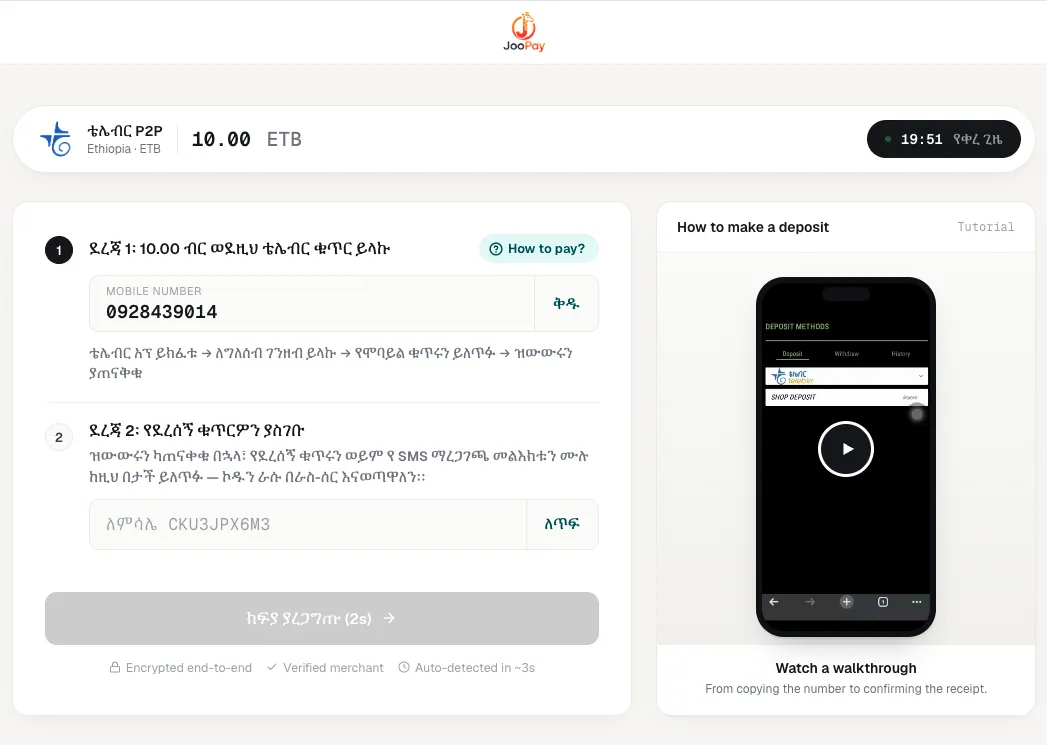
Keep the receipt until the balance updates. A typo in the transaction number is the most common reason a payment is not matched.
Before you pay
Use only a wallet registered in your own name. Payments made from someone else's number can be blocked during verification.
Deposits are also linked to bonuses. A welcome offer usually requires a qualifying deposit, so check the terms on the Bonuses page before paying if a promotion matters to you.
How to make a withdrawal
Withdrawals start from the Withdraw tab of the same cashier. Choose the method, enter the amount and the details of the wallet that should receive the money. The request then goes through the operator's checks before it is paid out.
- Withdraw to the same method you used for the deposit whenever possible. This is a standard anti-fraud rule at licensed operators.
- Make sure the account details match the name on the wallet.
- Track the request in the History tab, which lists both deposits and withdrawals.
Verification (KYC)
Operators can ask for an identity check before the first payout. Typically that means a photo of a national ID card or passport, and sometimes proof that the wallet belongs to the account holder. Filling in the profile correctly at sign-up saves time later; the steps are described on the Registration page.
Why a withdrawal can be delayed or rejected
- The account is not verified yet.
- The name on the account does not match the name on the wallet.
- A bonus with unfinished wagering is still active.
- The wallet number was entered with a mistake.
- The requested amount is outside the limits shown in the cashier.
Rejected requests are normally returned to the balance. If a reason is not given, ask Support.
Limits, fees and rules
The cashier displays the minimum and maximum for each method, and some providers or the mobile operator add their own fees. Read the amount summary before confirming, because the number in the last step is the one that counts. Deposit and withdrawal history stays in the History tab, so previous payments can be checked without contacting anyone.
Security of payments
The Telebirr payment page shows notes about encrypted transfer and a verified merchant. Still, some habits protect the player better than any badge:
- Open the cashier only from the official Mezzo bet address in the browser or the app.
- Never share a Telebirr PIN or an SMS code with anyone, including people who claim to be from Support.
- Do not pay to a number that was sent to you in a private message.
If a transaction did not arrive
- Wait a few minutes and refresh the balance and the History tab.
- Check that the money left the wallet and note the transaction ID.
- Contact Support through the chat button and send the ID, the amount, the time and the wallet number.
A screenshot of the receipt speeds things up. Without the ID, tracing a payment is slow.
Money and responsible gambling
Play only with money that is not needed for daily life, and set a personal budget before depositing. Betting is for adults aged 18 and over. If gambling stops being fun, take a break and seek help from a support organisation.
Responsible gambling
18+ only. Never chase losses and never bet borrowed money. Set a budget before you deposit.
Frequently asked questions
How do I make a Mezzo bet deposit?
Log in, open the cashier, choose Telebirr on the Deposit tab, enter the amount in ETB, send the money to the number shown and paste the transaction ID from the receipt on the payment page.
How do I withdraw money from Mezzo bet?
Open the Withdraw tab in the cashier, pick a method, enter the amount and the wallet details, then confirm. The request can be followed in the History tab.
What is the cashbox at Mezzo bet?
It is the cashier section where deposits, withdrawals and the transaction history are handled.
Which currency is used?
Ethiopian birr (ETB, Br). Amounts in the cashier are shown in birr.
Do I need to verify my account before withdrawing?
The operator may ask for an ID document and proof of wallet ownership before the first payout. Complete your profile correctly to avoid delays.
Why was my withdrawal rejected?
Typical reasons are an unverified account, a name mismatch between account and wallet, an active bonus with unfinished wagering, a wrong wallet number or an amount outside the limits.
My deposit did not arrive. What should I do?
Check the History tab, keep the transaction ID and receipt, and contact Support in the chat with the amount, time and wallet number.
What are the minimum and maximum amounts?
They depend on the method and are displayed in the cashier before you confirm a payment.